
Password manager for Windows 10 and 11
Your passwords stay on your PC.
Keys Wallet & Watch keeps every login, two-factor code, card and PIN in one locked vault on your own computer. Use it on all your PCs, share a client's logins with your staff, and take them back when someone leaves. No account to create and no monthly bill.
- 30 days free, no card
- One-time price, 5 PCs
- Only you hold the key
What is Keys Wallet & Watch?
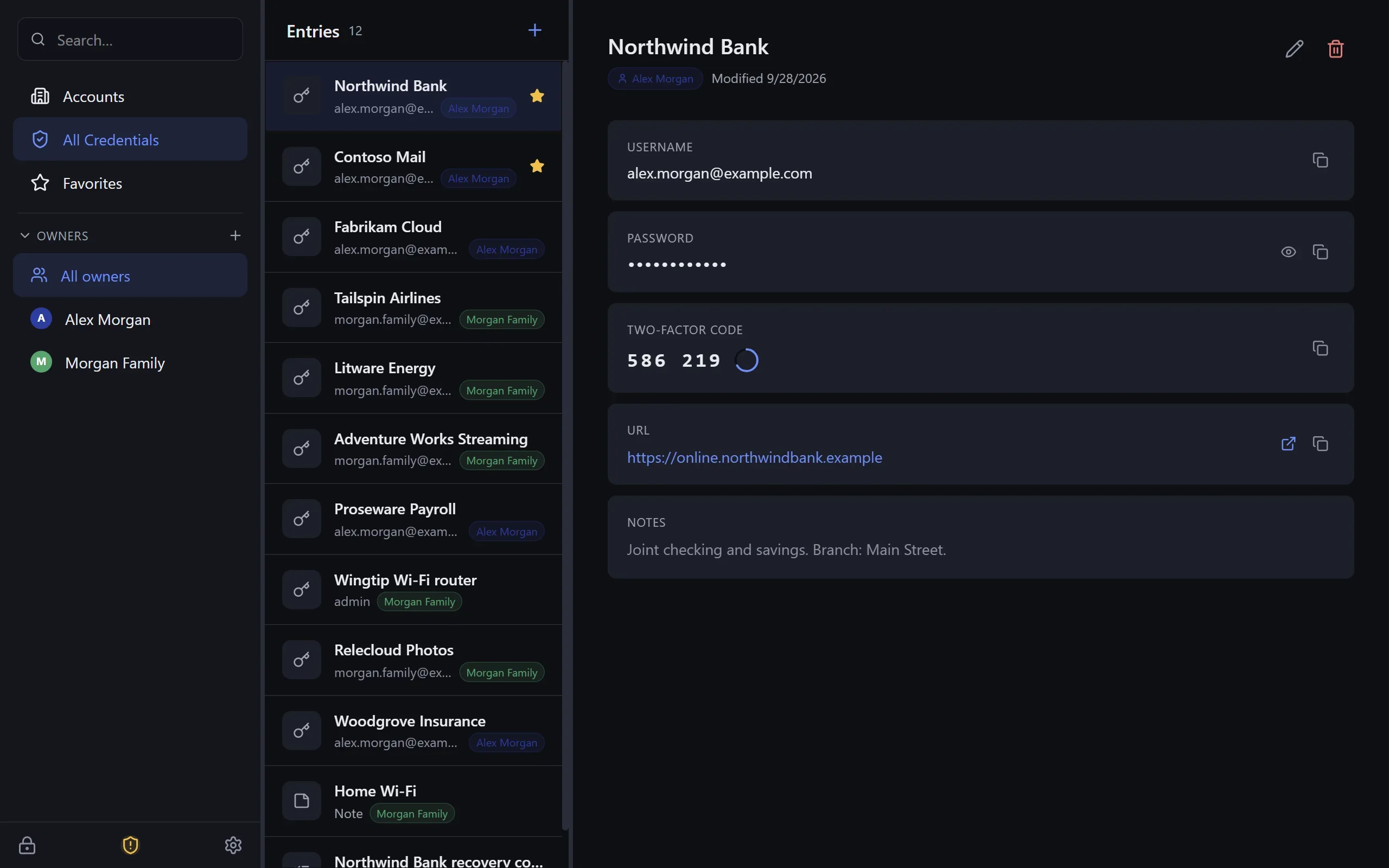
Keys Wallet & Watch is a password manager and digital wallet for Windows. Everything you save goes into one vault on your PC, locked with a master password that only you know. It holds logins and their two-factor codes, card and ID details, notes, and keys for software projects. It tells you which passwords are weak, reused or caught up in a known data breach. If you have more than one PC it keeps them all up to date, and our sync server can't read what it carries. It's a one-time $24.99 from Beckham Enterprises.
Who it's for
For people who'd rather keep their keys at home
No sign-up and no online account. Your vault is a file on your own PC, and you can back it up wherever you like.
Households
One vault for the family, with each login filed under the person it belongs to. Sync keeps every PC in the house up to date.
Small businesses
Keep company, staff and client logins apart. Give a technician one client's passwords instead of your whole vault, and take them back when they leave.
Developers
Developer Mode adds a safe place for API keys, .env files, SSH keys and certificates, grouped by project.
Real situations
What happens when…
The moments a password manager is really for.
A technician leaves
Remove them from the client projects you shared. The list disappears from their PC the next time their app goes online, and they get nothing new. Anything they already wrote down, they still know, so change the passwords that matter most.
A laptop is lost or stolen
Whoever has it finds a locked vault they can't open without your master password. If you sync, your other PCs still have everything. Remove the lost laptop from your devices and change your master password, and it gets nothing new.
You get a new PC
Install Keys Wallet & Watch, ask to join your vault, and approve the short code on your old PC. About five minutes later, everything is there.
Someone deletes the wrong thing
Deleted entries wait 30 days in the Recycle Bin. With sync on, you can also look back at any of the last 30 days and bring back what's gone.
Keys · Wallet · Watch
Three jobs, one vault
The name is the feature list: the keys you use every day, the wallet items you need now and then, and a watch on the lot.
Keys
Logins with their two-factor codes, recovery codes, Wi-Fi and alarm codes. Every password in one searchable place, one click to copy.
More about keys →Wallet
Card numbers, IDs, account details and anything else you'd rather not keep on paper, as secure notes filed by whose they are.
More about wallet →Watch
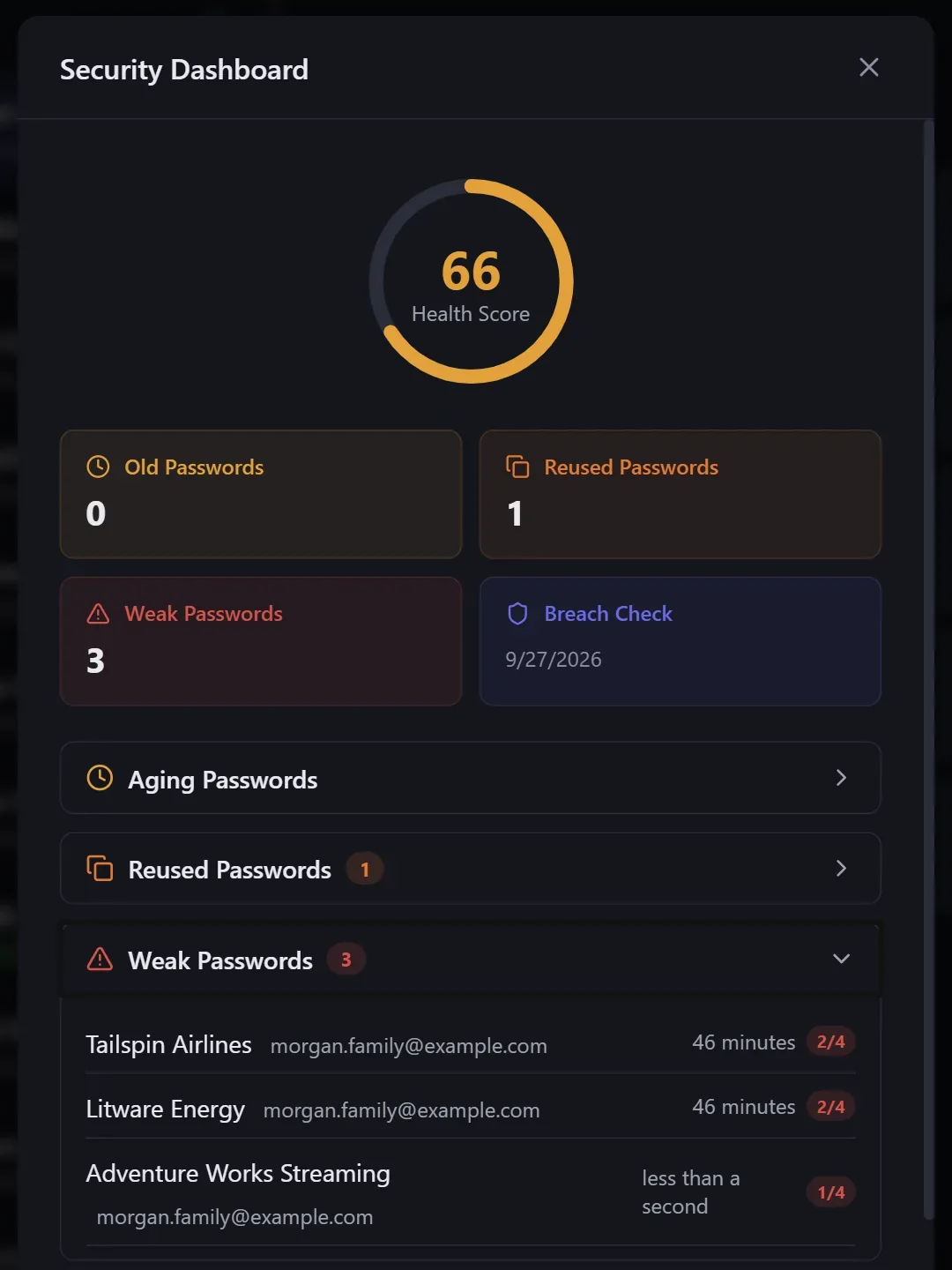
A health check that points out weak, reused and old passwords, tells you if one has turned up in a known data breach, and warns before a key or certificate expires.
More about watch →Your privacy
Locked on your PC, and only you hold the key
Your vault is encrypted on your own computer before anything is saved. Your master password never leaves the PC and we never get a copy, so we couldn't open your vault even if we were asked to.
- Works offline. You don't need our servers, or the internet, to open your vault.
- A spare key on paper. A printable recovery key is the only other way in. There is no "reset my password" back door.
- Private breach checks. It can tell you if a password has turned up in a known data breach, without ever sending the password.
- Locks itself. After 5 idle minutes by default, and straight away if someone connects to the PC remotely.
Sync between PCs
The same passwords on every PC, and we can't read them
Sync is optional. When it's on, each change is locked up on your PC, passed through our sync server and opened again on your other PCs. The server only ever holds a copy it can't read.
Your PC
Opens with your master password. Locks up every change before it leaves.
Readable only hereOur sync server
Passes the locked copy along and keeps 30 days of earlier versions, in case you need one back.
Can't read itYour other PC
Picks up your changes within a minute and fits them in with its own.
Readable only hereAdd a PC
On the new PC choose Join Synced Vault. It shows a short code that you approve on a PC that already has the vault.
Save anywhere
Change a password on one PC and the others pick it up within about a minute.
Edits fit together
Changed the same login on two PCs? The newest edit wins, and the older password is kept in that login's history.
Pricing
Buy it once. Add sync if you need it.
No subscription for the app. Sync is prepaid by the year and never auto-renews.
Keys Wallet & Watch license
$24.99one-time
Yours to keep, on up to 5 PCs. Every update included. No subscription.
- The full app: vaults, owners, two-factor codes, security dashboard, imports, Developer Mode
- Up to 5 PCs on one key; move it between PCs yourself
- Works offline for good once activated
- Try it free for 30 days first; sales are final
Secure checkout by Stripe. Your key arrives by email within a minute. Tax is added at checkout where it applies. By buying you agree to the terms; all sales are final.
Try it free for 30 days
Everything unlocked, including sync for 2 vaults. No card: request a trial key inside the app and it's emailed to you.
- Every feature, nothing held back
- Keep your vault when you buy: just enter the key
- Signed installer, no admin password needed
If the trial ends before you buy, your vault turns read-only. You can still open, copy and export everything.
Optional: sync between your PCs
Locked on your PC before it leaves, so we can't read it. Prepaid by the year (choose 1 to 10 years at checkout), never auto-renewed. A plan attaches to the license bought with the same email. Plans count vaults, not PCs.
Sync
$12/ year
Up to 2 vaults
One person with a vault or two on several PCs.
Sync Family
$24/ year
Up to 6 vaults
A household: everyone's own vault, plus shared projects.
Sync Team
$48/ year
Up to 15 vaults
A small office or team, shared projects included.
Straight answers
What it doesn't do (yet)
Better you hear it here than after you've paid. See how it compares with cloud and browser password managers.
No phone app yet
Windows 10 and 11 only for now. A phone app is planned, with no date promised.
Autofill in Edge first
The browser extension is in the Microsoft Edge store; Chrome and Firefox come next. Elsewhere you copy and paste, and the clipboard clears itself.
No password reset
Lose both the master password and the recovery key and the vault is gone for good. That's the point.
FAQ
Common questions
What is Keys Wallet & Watch?
Keys Wallet & Watch is a password manager and digital wallet for Windows 10 and 11. It keeps your logins, two-factor codes, card and ID details, notes and software keys in one locked vault on your own PC, opened with a master password only you know. Keeping several PCs in step is optional, and our sync server can't read what it carries. It is made by Beckham Enterprises.
Can Beckham Enterprises see my passwords?
No. Your vault is locked on your PC with a key made from your master password, and that password is never stored or sent anywhere. If you use sync, our server only ever receives the vault already locked. Nobody at Beckham Enterprises has anything that could open it.
Does it fill in passwords in my browser?
Yes, with the free browser extension. Click Fill and the login goes into the page; on a code page, one click fills the current two-factor code. When you sign up or change a password, the app asks whether to save it. The extension talks only to the app on the same PC, which must be running and unlocked, and nothing is filled until you click. Get it from the Microsoft Edge Add-ons store (opens in a new tab); the Chrome and Firefox versions are coming. Without it, you copy and paste with one click and the clipboard clears itself after 30 seconds by default.
Does it work on Mac, iPhone or Android?
Not yet. Keys Wallet & Watch runs on Windows 10 and 11 (64-bit) only. A phone app is planned, but there is no date for it, so don't buy expecting it.
Can I share passwords with my staff and take them back?
Yes. Put a client's or a department's logins in a project and share just that project, not your whole vault. Before you approve someone, the two of you compare a short code by phone or in person, and you choose whether they can edit or only view. When someone leaves, remove them: the project disappears from their PC the next time their app goes online, and they get nothing new. Anything they already copied down they still know, so change the passwords that matter. Sharing needs sync on both sides.
How does the free trial work?
Download and install the app, then request a trial key in Settings, License (it's emailed to you; no card needed). For 30 days everything is unlocked, including sync for 2 vaults. If the trial ends before you buy, the vault becomes read-only: you can still open it, view, copy and export everything. Nothing is deleted.
What happens if I forget my master password?
There is no reset, by design: nobody else has a copy. The way back in is the recovery key the setup wizard offers (a 40-character code starting KWWRK-). Print it and keep it somewhere safe. Without the master password or the recovery key, the vault cannot be opened by anyone, including us.
Put your passwords back on your own PC
Try every feature free for 30 days. If you keep it, it's $24.99 once for up to 5 PCs.