
Sync between PCs
The same passwords on every PC
Keep one vault up to date on your desktop, laptop and office PC, or share a client's logins with your team. Your PCs do the locking and unlocking; our sync server only carries a copy it can't read.
How does Keys Wallet & Watch sync work?
Each time you save, your PC locks the vault and sends it to our sync server. Your other PCs check for changes about once a minute and every time you unlock, fetch the newest copy and fit it together with their own, entry by entry. The server never has the key, so it can't read anything it holds. Sync is optional; without it, Keys Wallet & Watch works fully on one PC.
Your PC
Opens with your master password. Locks up every change before it leaves.
Readable only hereOur sync server
Passes the locked copy along and keeps 30 days of earlier versions, in case you need one back.
Can't read itYour other PC
Picks up your changes within a minute and fits them in with its own.
Readable only hereAdding a PC
How to add another PC
Signing in somewhere isn't enough to get your vault. A new PC has to be approved by one you already trust.
Takes about five minutes. Step-by-step directions are in the how-to guides (opens in a new tab).
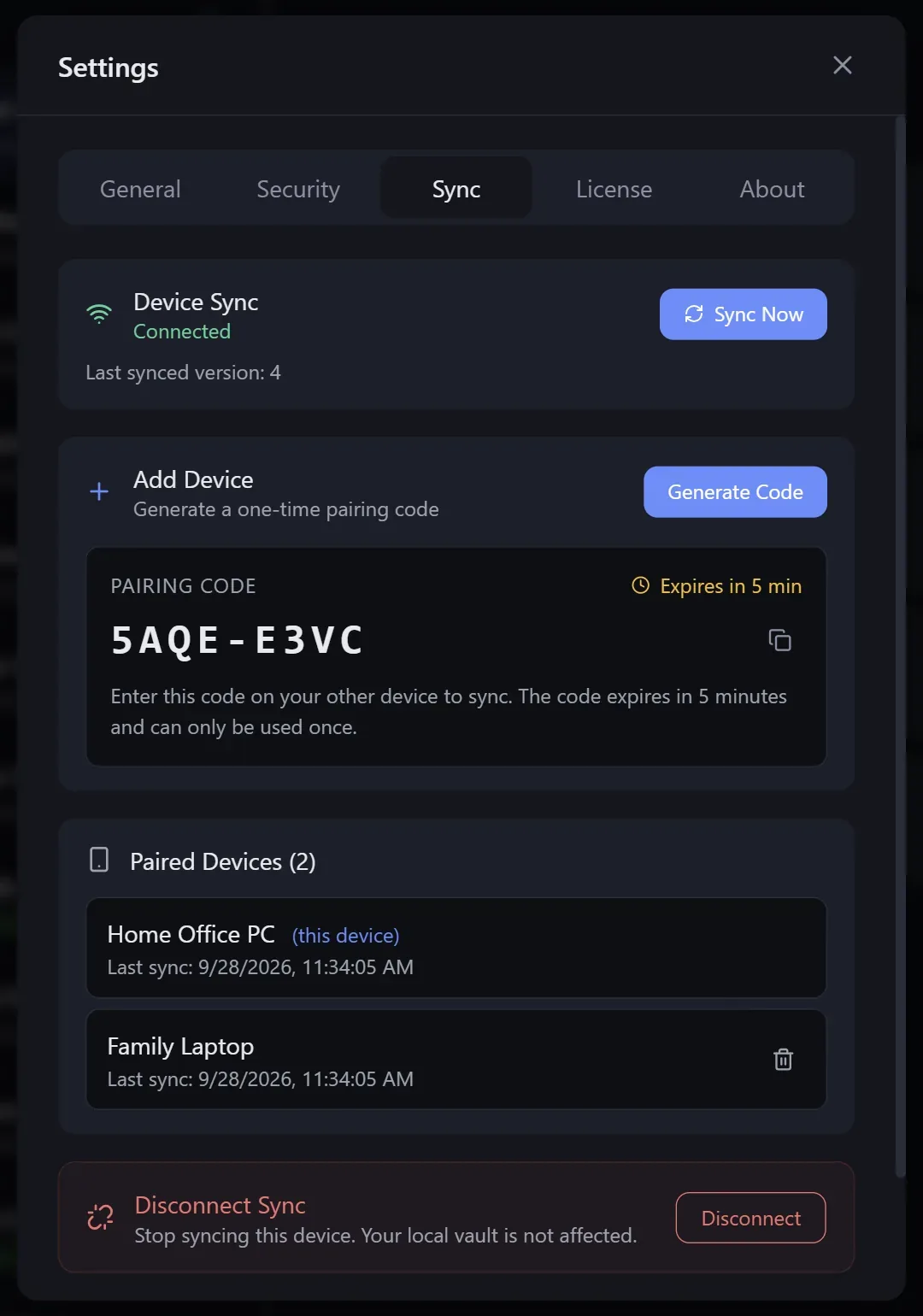
Turn on sync on your first PC
In the vault's sync settings, turn sync on. A locked copy of the vault goes to our sync server and this PC becomes the first device.
Choose Join Synced Vault on the new PC
Install Keys Wallet & Watch on the other PC and choose Join Synced Vault on the vault picker. It shows a short pairing code, valid for 5 minutes.
Approve the code on the first PC
On a PC that already has the vault, the request appears in the sync panel; approve it with that code. Nothing joins without this approval.
Unlock with your master password
The new PC fetches the vault and you open it with your usual master password. From then on every change syncs.
Edits on two PCs
Changes fit together instead of overwriting each other
Change things on your laptop and your desktop, even at the same moment, and the changes are combined entry by entry instead of one PC wiping out the other.
| What happened | Result after the merge |
|---|---|
| An entry changed on one PC only | That change is kept. |
| The same entry changed on both PCs | The newest edit wins. The older password is kept in that entry's history, so it isn't lost. |
| An entry was deleted on one PC | It's deleted on the others too, unless someone edited it after the delete. Then the edit wins. |
| You changed the master password | Your other PCs use the new password after their next sync. |
Our sync server also keeps the last 30 days of your vault, locked like everything else. If something was deleted by mistake, pick a day on the Sync tab and bring back what's gone; nothing you have now is changed. Exactly how merging works.
Shared projects
Hand a client's passwords to your staff, and take them back
Share one project, say a client's logins or the office accounts, with the people who need it. Everything else in your vault stays private.
1. Invite
Create an invite code for the project and give it to your colleague. It works for 10 minutes.
2. Check
When they ask to join, compare a short code by phone or in person. If it matches, you know it's really them.
3. Approve
Let them edit, or only view. Someone who can only view can't change anything.
4. Take it back
When a technician leaves, remove them. The project disappears from their PC the next time their app goes online, and they get nothing new. Anything they already wrote down they still know, so change the passwords that matter most.
You can hand a project to another member, or take over one whose owner has left. Deleted entries wait in the project's trash for 30 days, where any member can bring them back, and the owner can also go back to any of the last 30 days. How sharing is secured →
Plans
Sync plans
Prepaid by the year (1 to 10 years in one payment), never auto-renewed. Plans count vaults, not PCs. The 30-day trial includes sync for 2 vaults.
Sync Family
$24 / year
Up to 6 vaults, shared-project members included
A household: everyone's own vault, plus shared projects.
Buy Sync Family for $24 a yearSync Team
$48 / year
Up to 15 vaults, shared-project members included
A small office or team, shared projects included.
Buy Sync Team for $48 a yearA sync plan attaches to the Keys Wallet & Watch license bought with the same email; the app picks it up at its next check-in. If a plan runs out, syncing stops; every PC keeps its own copy of the vault and carries on working. Full pricing →
FAQ
Sync questions
Do I need sync?
Only if you want the same vault on more than one PC. Without sync, Keys Wallet & Watch is a complete password manager on one computer, and the vault file is yours to back up however you like.
How do I add another PC to a synced vault?
Install Keys Wallet & Watch on the new PC and choose Join Synced Vault. It shows a short pairing code. On a PC that already has the vault, approve that code. The new PC then fetches your vault and you open it with your usual master password. Codes expire after 5 minutes, so nobody can use one later.
What happens if I edit the same entry on two PCs?
Nothing is overwritten wholesale. Changes are matched up entry by entry: if a login changed on only one PC, that change is kept. If it changed on both, the newest edit wins and the older password is kept in that login's history, so it isn't lost. Deletions sync too.
Can I share passwords with my staff and take them back?
Yes. Put a client's or a department's logins in a project and share just that project, not your whole vault. Before you approve someone, the two of you compare a short code by phone or in person, and you choose whether they can edit or only view. When someone leaves, remove them: the project disappears from their PC the next time their app goes online, and they get nothing new. Anything they already copied down they still know, so change the passwords that matter. Sharing needs sync on both sides.
What does "vaults" mean in the sync plans?
A vault is one encrypted password file, such as your personal vault or a shared family one. Sync plans count vaults, not PCs: Sync covers 2 vaults, Sync Family 6 and Sync Team 15. Shared-project members are covered by Family and Team.
Try sync free for 30 days
The trial includes sync for 2 vaults, so you can pair your PCs before you pay anything.